Blog
EV Charger Smartphone App Complete Guide: Solar Monitoring & Smart Charging in 2026
Your EV charger came with a smartphone app. Maybe you downloaded it, tapped around for five minutes, and went back to just plugging in your car. That is actually pretty common. Most EV owners never scratch the surface of what their EV charger smartphone app can do. But if you want to cut your electricity bills, charge smarter with your solar panels, and actually understand what is happening when your car is plugged in, that app is worth knowing inside out. This is the EV charger smartphone app complete guide for homeowners who want more from their charging setup in 2026.
Modern smart EV chargers ship with apps that do way more than start and stop a charging session. These apps connect your charger to your home network, sync with time-of-use utility rate schedules, coordinate with solar inverters, and give you a detailed view of every kilowatt that flows into your car. If you have ever wondered whether you are actually charging at the fastest rate your home can handle, or whether your overnight sessions are hitting the cheapest electricity window, the answers are all in the app.
What Can an EV Charger Smartphone App Actually Do?
The short answer is: a lot more than most people realize. Here is a rundown of the features that actually matter in everyday use.
Remote Start and Stop
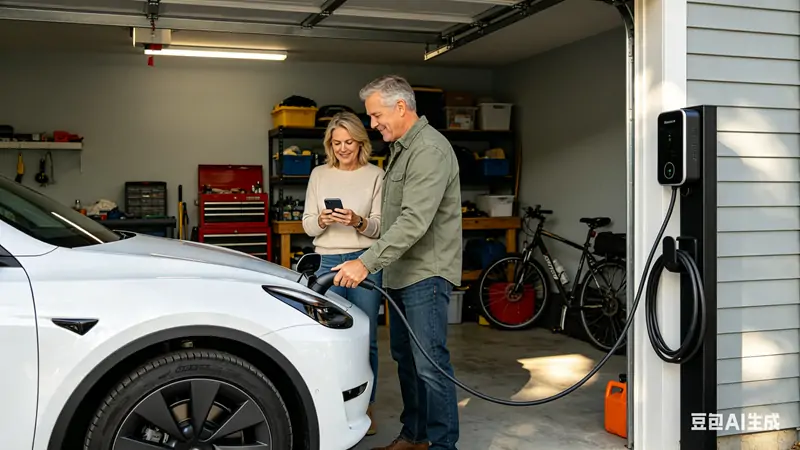
This sounds obvious, but it goes deeper than just tapping a button when you are standing next to your car. With your EV charger smartphone app, you can start a charging session from anywhere. You forgot to plug in before leaving for work? You can start it from your office. You want to squeeze in one more hour of charging before you leave for an evening trip? Tap the app and watch the progress bar climb in real time.
Some apps also let you set up geofencing so charging automatically starts when you pull into the driveway and stops when you leave. No app required at that point. The charger just knows.
Charging Schedule Management
This is the feature that saves real money. Most utility companies in the US now offer time-of-use pricing, where electricity costs two to four times more during peak afternoon hours than it does late at night. If you are on one of these plans and you charge your EV during peak hours, you could be paying $0.40 per kWh instead of $0.10 per kWh. Over a year of daily charging, that difference adds up to several hundred dollars.
Your EV charger smartphone app lets you set a charging schedule that automatically starts charging at the cheapest rate window, even if you plug in as soon as you get home. Most people plug in at 6pm when they get home from work. But the cheapest rates often do not kick in until 11pm. A good app bridges that gap without you having to think about it.
Real-Time Energy Monitoring
How much did that charging session cost? How many miles of range did you add? What was the average power draw over the last week? Month? A solid EV charger smartphone app with solar monitoring built in will show you exactly how much energy came from your solar panels versus the grid. This is not just interesting information. It tells you whether your solar system is actually covering your charging needs or whether you are still pulling significant grid power.
Over time, this data helps you understand your actual energy consumption pattern. You might discover that your weekly charging costs are higher than you thought, or that your solar setup is generating more surplus than you realized. Either way, you can make adjustments.
Solar Integration and Excess Energy Tracking
If you have solar panels, this is where things get genuinely useful. A smart EV charger with solar monitoring integration can automatically adjust your charging rate based on how much excess solar energy your home is producing right now. During a sunny afternoon, your panels might be generating 5kW more than your house needs. A solar-aware charger will pull that entire 5kW into your car. When clouds roll in and output drops to 2kW, the charger scales back accordingly.
Some systems go even further. The most advanced setups communicate directly with your solar inverter, getting real-time generation data and adjusting charging in seconds rather than minutes. If you have a Tesla Powerwall or similar battery storage, the charger can coordinate with both your solar production and your home battery, prioritizing solar energy and only tapping stored battery power when solar output cannot cover your charging needs.
Not every solar-compatible charger works with every inverter. Brands like Enphase, SolarEdge, and Tesla each have their own integration ecosystems. Before buying a charger specifically for solar use, confirm it works with your specific inverter. This is the most commonly overlooked compatibility check, and it causes the most regret.
Firmware Updates and Feature Additions
Smart chargers get better over time through software updates. A good EV charger smartphone app will notify you when a firmware update is available and walk you through installing it. Some updates add new scheduling options. Others improve charging efficiency. A few have historically added entirely new features like improved solar integration logic or new rate schedule integrations.
Chargers that do not have app connectivity miss out on all of this. They are essentially frozen in time from the day you bought them. A connected charger keeps learning and improving.
How to Set Up Your EV Charger Smartphone App the Right Way
Setting up the app is usually straightforward, but a few steps trip people up. Here is how to do it right the first time.
Step 1: Download Before You Mount
Download the charger manufacturer app before you install the hardware. Most apps walk you through the setup process, and you will need your WiFi network name and password ready. Trying to read setup instructions on your phone while standing on a ladder with wires in your hand is not ideal.
Step 2: Connect to 2.4GHz WiFi
Most smart EV chargers use 2.4GHz WiFi, not 5GHz. This matters because 2.4GHz travels farther through walls, which is exactly what you need for a charger mounted in a garage or carport. If your home router broadcasts both bands under the same name, your charger might grab the 5GHz signal and then drop it constantly because it cannot maintain that connection through exterior walls.
Create a separate 2.4GHz network for your smart home devices, or check your router settings to confirm the charger is connecting to the right band. This single step prevents most of the connectivity problems people experience with smart chargers.
Step 3: Set Your Rate Schedule First
Before you start using the charger, go into the app and find the time-of-use or rate schedule settings. Enter your utility company and your rate plan if the app supports it automatically. If it does not have your specific utility, you can usually set custom time windows manually. This one setting alone can cut your charging costs by 30 to 50 percent compared to charging during peak hours.
Step 4: Calibrate Solar Integration
If you have solar panels and your charger supports solar integration, the app will walk you through connecting to your inverter or energy monitor. This process varies by brand. Some use a simple pairing mode. Others require you to enter API credentials for your solar monitoring platform. Follow the app instructions carefully and test the solar monitoring display after setup to confirm it is reading your solar production accurately.
Solar Monitoring: The Feature That Justifies the Upgrade
If you are on the fence about whether a smart charger is worth it, solar monitoring alone might settle the question. Here is what it looks like in practice and why it matters.
Seeing Where Your Energy Comes From
A good solar monitoring display in your app breaks down every charging session into solar energy used versus grid energy used. Over a month, you can see exactly what percentage of your charging came from your roof. For many solar owners, this number surprises them. Some discover that 70 to 80 percent of their charging energy came from solar, meaning they drove hundreds of miles that month at almost zero net grid cost.
Others discover the opposite: their solar system is too small to meaningfully offset their charging, or their charging habits do not align well with when their panels produce the most energy. In both cases, the data is valuable. You cannot optimize what you cannot measure.
Setting Solar-Only Charging Thresholds
Some apps let you set a minimum solar threshold for charging. You can tell the charger to only pull from the grid if solar production drops below a certain level, or to use grid power as a supplement only when solar cannot meet your charging needs. These settings let you align your charging behavior with your energy philosophy, whether that means zero grid reliance or simply prioritizing solar when available.
Tracking Monthly and Yearly Solar Offset
Over months and years, your app builds a record of how much solar energy you have used for charging. This matters because solar systems pay for themselves based on the total value of energy they produce. If your charger is logging significant solar energy going into your car, that adds to the economic case for your solar investment. Some apps generate simple reports you can share or use for tax purposes if you have a commercial EV deduction.
Common Problems and How the App Helps Solve Them
Charging Speed Slower Than Expected
If your app shows your charger is delivering 6kW instead of the 9.6kW you expected, the app data tells you why. It might be that your car is limiting the charge rate to protect battery health. It might be that your panel is hot and derating slightly. Or it might be that your home electrical setup is limiting input. The app shows you the actual voltage and amperage, so you can diagnose whether the problem is your charger, your car, or your wiring.
Charger Going Offline
Smart chargers that lose WiFi regularly are one of the top complaints in EV owner forums. Your EV charger smartphone app typically sends a notification when the charger goes offline. If you see this happening repeatedly, it is a signal to improve your WiFi situation. Solutions include moving your router closer, adding a WiFi extender, switching to a mesh network, or running an ethernet cable to the garage. Some chargers now offer cellular connectivity as a backup, which is worth considering if your garage WiFi is genuinely difficult to reach.
Phantom Drain After Charging Stops
Some newer EVs pull a small amount of standby power from the charger even after the session completes. Your app will show this if you look at the real-time power reading. If you notice your charger drawing 50 to 100 watts after your car says it is full, that is standby power going to the car through the pilot signal. In most cases it is negligible. But if it bothers you, some apps let you cut power to the charger on a schedule, completely eliminating the draw.
What to Look for in an EV Charger App in 2026
Not all apps are equal. Here is what separates the ones that actually make charging better from the ones that are just boxes to check.
Intuitive Interface
If you have to read a manual to figure out how to schedule a charging session, the app is not good enough. Download the app from the App Store or Google Play and use it for ten minutes before you buy the charger. Can you find your charging history? Can you see real-time power flow? If the app feels clunky or confusing at the demo stage, it will not get better after you buy the hardware.
Solar Integration Depth
Some apps show a single solar-versus-grid number. Others break it down session by session, hour by hour. The more granular the data, the more useful it is for actually optimizing your energy use. Look for apps that integrate directly with major solar inverter brands rather than requiring a generic energy monitor.
Reliable Notifications
You want to know when your car finishes charging, when charging slows to protect battery health, and when something goes wrong. You do not want to be pinged every 15 minutes with updates you did not ask for. A good app lets you customize exactly which notifications you receive.
Multi-User Support
If multiple people drive the same EV or if you have multiple EVs with one charger, you want the app to support multiple user accounts or at least clear session histories for each driver. Some apps tag each session to the phone that started it, making it easy to track who charged when and how much.
Open API or Third-Party Integration
The best apps expose their data to home automation platforms. If you use Home Assistant, SmartThings, or similar systems, you want your charger data flowing into your broader smart home dashboard. Not all apps support this, but the ones that do offer significantly more flexibility for power users.
EV Charger Smartphone App Complete Guide: Frequently Asked Questions
Do all smart EV chargers come with a smartphone app?
Most smart EV chargers include an app, but not all of them do. Basic Level 2 chargers that are not network-connected will not have an app. If app control and solar monitoring are important to you, check the product specifications carefully before buying. Some chargers marketed as “smart” only offer basic scheduling via a physical button or dial, with no app or remote monitoring capability.
How does the app affect my privacy?
The app connects your charger to the internet and collects data about your charging sessions, energy use, and sometimes your location (for geofencing features). Review the manufacturer privacy policy before installing. Most reputable brands anonymize charging data and use it to improve products. If privacy is a concern, look for chargers that store data locally and offer a local-only mode that does not require cloud connectivity.
Will my charger still work if the app goes offline?
Yes. Your charger will continue to charge your car even if the app servers go down or your phone is not connected. You just will not be able to control it remotely or receive notifications until connectivity is restored. Some chargers store the last known schedule locally and continue running it even without an active internet connection.
Can I use the app to charge multiple EVs from one charger?
Some chargers support charging two vehicles simultaneously with a shared power limit, controlled through the app. This is less common in residential chargers but does exist. If you have or plan to have multiple EVs, check whether the charger supports dual-vehicle charging and how the app manages power distribution between two cars.
What happens if I change my WiFi network or router?
You will need to reconnect your charger to the new network through the app. Most apps have a WiFi reset process that lets you put the charger back into pairing mode so you can connect it to a new network. This usually takes a couple of minutes and does not require an electrician.
Does solar monitoring work with any solar system?
Not universally. Solar monitoring integration requires the charger app to be compatible with your specific solar inverter or energy monitoring system. Chargers that work with Enphase, SolarEdge, Tesla Powerwall, and SMA inverters are widely available. If you have a less common inverter brand, confirm compatibility before buying a charger for its solar integration features.
Ready to Get More from Your Charger?
Most EV owners set up their charger once, never open the app again, and miss out on hundreds of dollars in potential savings. If you take 20 minutes to actually learn what your EV charger smartphone app can do, you will probably find at least one feature that makes a real difference in your daily routine. The solar monitoring alone, if you have panels, can change how you think about the relationship between your roof and your car.
Whether you are still choosing which smart charger to buy or you already have one and have been ignoring the app, now is the right time to plug in and explore. Your electricity bills will notice the difference.
Browse FlagTools smart EV chargers with full app control and solar monitoring to find a model that matches your home setup. Every charger we carry comes with a complete app experience, not a stripped-down version. If you have questions about which charger works best with your specific solar system or rate plan, our team can walk you through the options.
Explore the full range of Level 2 smart EV chargers at FlagTools to find your ideal setup.
Also learn about how solar EV charging works and whether it makes sense for your home.